


Google has introduced a new AI model, Gemini Nano, directly into the Chrome browser, allowing developers to easily utilize advanced AI functions in their web applications. Here’s a summary of the integration:
Advantages of Gemini Nano AI Integration in Browser:
Performance and Speed:
- Operates locally on modern computers, providing instant responses without server communication.
- Real-time AI operations are crucial for users needing quick answers.
Optimistic AI:
- Similar to
useOptimisticin React,window.aiperforms preliminary calculations locally, giving immediate results while cloud AI refines them, reducing latency and improving efficiency.
- Cost Efficiency:
- Many AI tasks can be handled by local AI, reducing the need for costly server operations.
- Applications can function offline or with unstable internet connections, ensuring reliable performance in various environments.
Increased Privacy:
- AI calculations occur on the user’s device, so sensitive data doesn’t need to be sent to external servers, enhancing data privacy and security.
How to Access Gemini Nano in Chrome?
Currently, Gemini Nano is only available in the latest version of Chrome Canary. To use it, enable several internal flags in Chrome.
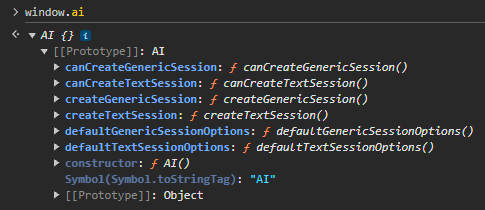
Step-by-Step Guide:
Enable “Prompt API for Gemini Nano” flag:
- Open Chrome Canary.
- Enter
chrome://flags/#prompt-api-for-gemini-nanoin the address bar. - Find the “Prompt API for Gemini Nano” flag and select “Enabled”.
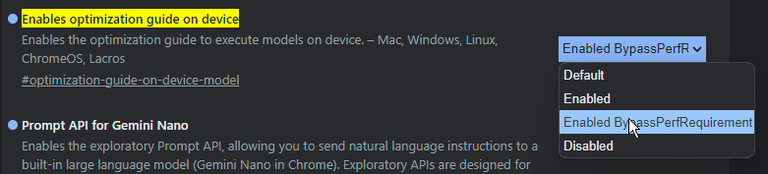
Enable “Enable optimization guide on device” flag:
- Enter
chrome://flags/#optimization-guide-on-device-modelin the address bar. - Find the “Enable optimization guide on device” flag and select “Enabled BypassPerfRequirement”.
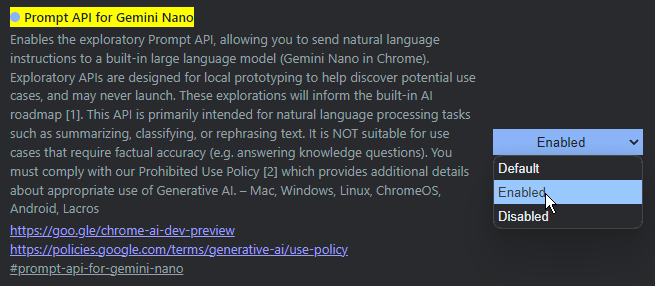
Install Chrome Component:
- Enter
chrome://components/in the address bar. - Find “Optimization Guide On Device Model”.
- Click the “Check for update” button to install the component.
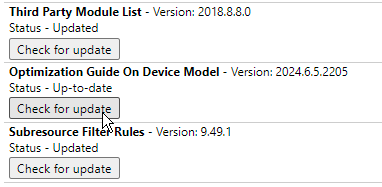
Downloading the AI model might take a while as it’s installed locally on the device. Ensure these instructions are followed for the Canary version of Chrome, which might be less stable than the standard version.
Use Cases of window.ai:
- Automatic Form Filling:
   document.addEventListener('DOMContentLoaded', async () => {
     if (window.ai) {
       const model = await window.ai.createTextSession();
       const formData = await model.prompt("Fill out the form with my personal details");
       document.querySelector('#name').value = formData.name;
       document.querySelector('#email').value = formData.email;
       document.querySelector('#address').value = formData.address;
     }
});- Error Correction and Validation:
   document.querySelector('#textInput').addEventListener('input', async (event) => {
     const text = event.target.value;
     if (window.ai) {
       const model = await window.ai.createTextSession();
       const correctedText = await model.prompt(`Correct the following text: ${text}`);
       document.querySelector('#correctedText').innerText = correctedText;
     }
   });
Higher-Level Use Cases:
- Natural Language Filtering: Allow users to search and filter content using natural language.
- UI Suggestions: Propose user interface changes based on user behavior and application context.
- Summarizations: Generate summaries of long texts that can be further processed in the cloud for more accurate results.
Benefits for Developers:
- Ease of Implementation:
- The browser manages AI models, including device capabilities and model updates, so developers don’t need to handle large model downloads or updates.
- Access to Hardware Acceleration:
- The browser is optimized to make the most of available hardware, ensuring the best performance on any device.
- Local Processing of Sensitive Data:
- AI operating on the device can improve application privacy by enabling end-to-end processing of sensitive data.
Future of window.ai:
The integration of Gemini Nano in Chrome is just the beginning. Google plans to introduce more AI features like transcription, translation, and text summarization. Developers can join the early preview program to experiment with new APIs and help shape the future of AI in browsers.
Summary:
Google’s Gemini Nano introduces a new era of AI integration in web browsers. With window.ai, developers can easily incorporate advanced AI features into their web applications, leveraging the power of local processing and hardware acceleration, benefiting both performance and privacy. The provided examples demonstrate the versatility of these technologies, and future developments promise even more possibilities.
Leave a Reply